Sometimes it can be easy if put all the information in one place related what we changed in our AL extension specially when there are multiple developers are working together,
<b>use of Markdown file.</b>
<b>Is it best idea?</b>
Yes, unlike a documentation trigger of each object, I would say this is the file README.md can be your whole Project's documentation trigger 👀 Called <b><a href="https://medium.com/analytics-vidhya/how-to-create-a-readme-md-file-8fb2e8ce24e3" target="_blank" rel="noopener">MarkDown</a></b>
<b>How to use it?</b>
Just visit your AL code, create a new file and name it with a README.md.
see below 👇
<img class=" wp-image-232 aligncenter" src="https://www.navwithnav.com/wp-content/uploads/2022/09/image-2-300x99.png" alt="" width="646" height="213" />
<ul>
<li><strong>2nd</strong></li>
</ul>
<img class=" wp-image-233 aligncenter" src="https://www.navwithnav.com/wp-content/uploads/2022/09/image-3-300x72.png" alt="" width="633" height="152" />
<div class="separator">
<ul>
<li><b>3rd interesting part > Write your own documentation 👲</b></li>
</ul>
<div><b>Start writing your version control or anything else here we go, and then click on Right hand corner button (Open Preview)</b></div>
<div><b> </b></div>
<div>
<div class="separator"><img class=" wp-image-234 aligncenter" src="https://www.navwithnav.com/wp-content/uploads/2022/09/image-2-1-300x69.png" alt="" width="669" height="154" /></div>
<b>
See how it looks like :</b>
</div>
<div><b> </b></div>
</div>
<div>
<div class="separator"><img class=" wp-image-235 aligncenter" src="https://www.navwithnav.com/wp-content/uploads/2022/09/image-1-2-300x60.png" alt="" width="655" height="131" /></div>
</div>
We have some cool features and market extension
<div><a href="https://code.visualstudio.com/docs/languages/markdown" target="_blank" rel="noopener">Use me</a> to check those out</div>
<div></div>
<div></div>
<div>Enjoy 👦👦👦</div>
Back to Series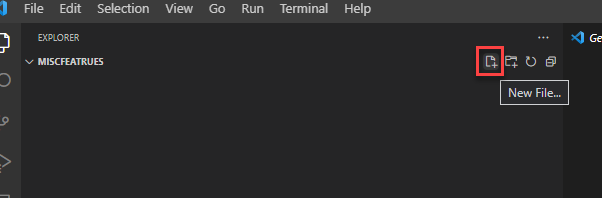
Uncategorized
README.md (Markdown) file in AL Code for writing your version control or project definition details
Sometimes it can be easy if put all the information in one place related what we changed in our AL extension specially when there are multiple developers are working together, <b>use of Markdown fi...
NitinSeptember 23, 2022 2 min read
Business CentralAL ProgrammingVS CodeDocumentation
Share this Article
0
0
Discussion (0)
No comments yet. Be the first to share your thoughts!
Newsletter
Stay updated with the latest Business Central development tips.

Nitin Verma
Solution Architect
Extensive experience specializing in Microsoft Dynamics NAV, Business Central, Power Platform, and ERP Architecture.
Read full bioSearch Articles
Monthly Archive
Loading...